Thermal Expansion Calculator
Pick a material, enter the length and the two temperatures to see how much the part grows or shrinks and its final length.
The Thermal Expansion Calculator estimates how much a metal part gets longer or shorter when its temperature changes. Enter a length, a starting temperature and a final temperature, choose a material such as aluminum 6061, carbon steel 1020 or stainless steel 304, and the tool returns the change in length in millimetres and inches, the length at the final temperature and the strain.
It is useful for machinists, engineers and inspectors who need to know how a part will size at a different temperature before they cut, fit or measure it. The material values are typical room-temperature coefficients, so you can also enter your own from a material certificate or data sheet.
The calculator runs in your browser. It is free, needs no sign-up, and works on a phone.
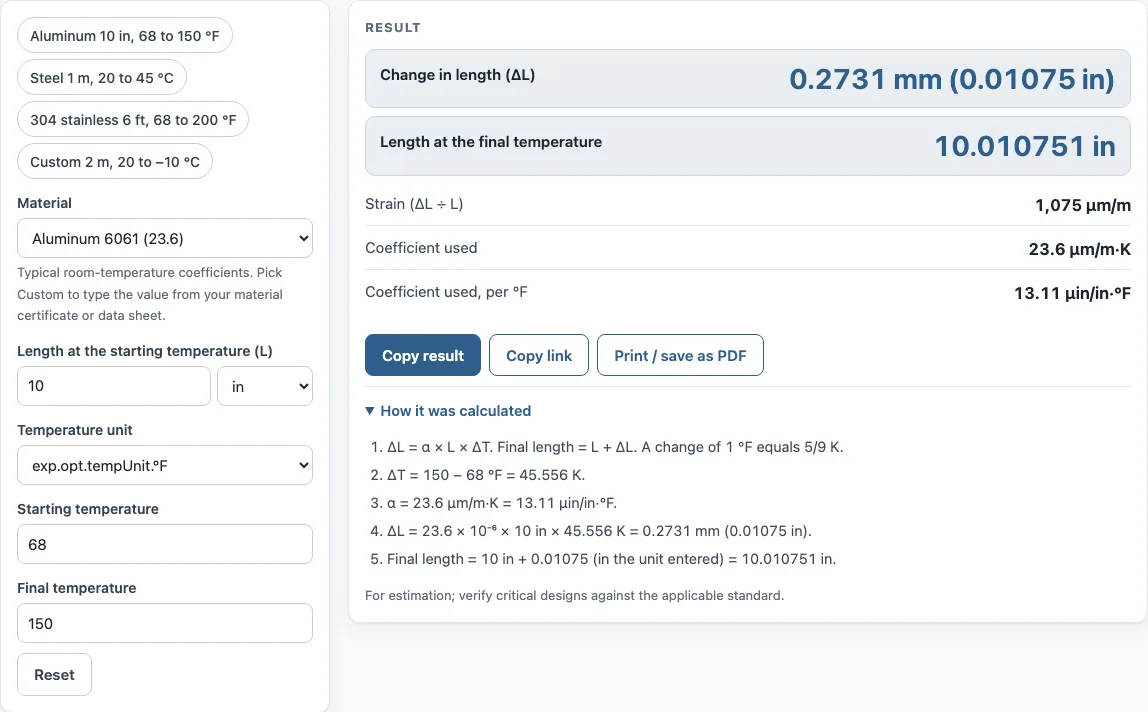
How to use the Thermal Expansion Calculator
- Choose the Material from the list. Pick one of the listed alloys, or choose Custom coefficient.
- If you chose Custom coefficient, type the α value in µm/m·K. Accepted values are between −50 and 500. If your data sheet gives a per-°F value, multiply it by 1.8.
- Enter the Length at the starting temperature. Choose its unit: in, mm, ft or m.
- Choose the Temperature unit, °C or °F.
- Enter the Starting temperature and the Final temperature.
- Read the results: the change in length (ΔL) in mm and inches, the length at the final temperature, the strain, the coefficient in µm/m·K and the coefficient per °F in µin/in·°F.
Results update as you type, so you can change one input and watch the effect. A negative ΔL means the part shrinks. Open How it was calculated to see the formula with your numbers in each step.
The page has four presets: Aluminum 10 in from 68 to 150 °F, Steel 1 m from 20 to 45 °C, 304 stainless 6 ft from 68 to 200 °F, and Custom 2 m from 20 to −10 °C. Use Copy result to copy the result lines with a link, or Copy link to copy the page address. That address stores every input, so opening it later restores the same calculation. Print / save as PDF prints the inputs, results, calculation steps and the date.
How do you calculate thermal expansion of a metal?
Multiply three values: the coefficient of thermal expansion (α), the starting length (L) and the temperature change (ΔT). The result, ΔL = α × L × ΔT, is the change in length, and adding it to the starting length gives the length at the final temperature.
Keep the units consistent. The coefficient is in µm/m·K, which is the same as 10⁻⁶ per °C, so a length in metres gives ΔL in micrometres. If your temperatures are in °F, convert the difference first, because a 1 °F change equals 5/9 K. For example, 1 m of carbon steel 1020 heated by 25 K (20 to 45 °C) gives 11.7 × 10⁻⁶ × 1000 mm × 25 = 0.2925 mm.
How much does aluminum expand per degree?
Aluminum 6061 has a coefficient of 23.6 µm/m·K, so each metre grows about 23.6 µm for each kelvin or degree Celsius of rise. Per degree Fahrenheit the figure is 13.1 µin/in·°F, because one °F is only 5/9 K.
For a 10 in part heated from 68 to 150 °F, the change is 82 °F, or 45.6 K. The tool gives ΔL = 0.2731 mm (0.01075 in). That is about 0.00108 in of growth for each inch of length over that range.
What is the coefficient of thermal expansion of steel?
The value depends on the grade. The tool lists carbon steel 1020 at 11.7 µm/m·K, stainless steel 316 at 15.9, stainless steel 304 at 17.2 and gray cast iron at 11.4. Invar, a nickel-iron alloy, is much lower at 1.6, which is why it is chosen where dimensional stability matters.
These are typical room-temperature values, and they change with the temperature range. For a temperature change over 300 K, the tool shows a warning; get a value for that range from your supplier and enter it as a custom coefficient.
Does a part shrink when it cools?
Yes. When the temperature falls, ΔT is negative, so ΔL is negative and the part gets shorter. The formula does not change; only the sign does.
The Custom preset shows this. A 2 m part with α of 12 µm/m·K cooled from 20 to −10 °C has ΔT of −30 K, so ΔL = −0.72 mm (−0.02835 in). The length at the final temperature is correspondingly smaller than the starting length.
Sources
- ΔL = α × L × ΔT — linear thermal expansion, as in W. D. Callister, Materials Science and Engineering: An Introduction
- Linear thermal expansion coefficients of metals (AmesWeb) — room-temperature values for 6061, 1020, 304, 316, C26000, C11000, Ti-6Al-4V, gray cast iron and Invar, citing Callister and Machinery’s Handbook, 29th ed., pp. 376–377
- 1 in = 25.4 mm exactly (NIST SP 811); 1 °F change = 5/9 K
Worked examples
| Input | Result |
|---|---|
| Aluminum 6061 (23.6), 10 in, 68 to 150 °F | ΔL 0.2731 mm (0.01075 in) |
| Carbon steel 1020 (11.7), 1000 mm, 20 to 45 °C | ΔL 0.2925 mm (0.01152 in) |
| Stainless steel 304 (17.2), 6 ft, 68 to 200 °F | ΔL 2.307 mm (0.09082 in) |
| α 12 µm/m·K, 2 m, 20 to -10 °C | ΔL -0.72 mm (-0.02835 in) |
Calculated by the tool above with these values.
Frequently asked questions
Does the calculator account for stress in a clamped part?
No. It estimates free expansion of a uniform part at a uniform temperature. It does not calculate stress in a constrained part, and it does not model different temperatures along the part.
What if my temperature change is more than 300 K?
The tool shows a warning, because coefficients change with temperature. Get a value for your temperature range from the material supplier and enter it as a custom coefficient.
Why does the result show a coefficient per °F?
If you work in imperial units, the per-°F value is easier to read. It equals α ÷ 1.8 and is shown in µin/in·°F. For example, aluminum 6061 at 23.6 µm/m·K is 13.1 µin/in·°F.
Why do I get an error when I enter my numbers?
The tool shows an error if the length at the final temperature would be zero or less. Check the length, the two temperatures and the coefficient, especially for a large temperature change with a long part.
Where do the material coefficients come from?
They are typical room-temperature values from a published table of linear expansion coefficients for metals, listed under Sources. They differ between alloys and tempers, so use Custom coefficient with the figure from your material certificate when it matters.
Can I use it for plastics or other non-metals?
Yes, if you choose Custom coefficient and type the value from the supplier’s data sheet in µm/m·K. The listed materials are metals only.
Related tools
- SFM calculator: use it to convert cutting speed to spindle RPM when you are setting up a turning or milling job.
- Surface finish calculator: use it to estimate surface roughness from feed and tool nose radius.
- Taper angle calculator: use it to work out the angle for a tapered part from its dimensions.
- True position calculator: use it to check hole location tolerances against a position callout.
- Tenths to inches calculator: use it to convert tenths, thou and mm readings to decimal inches.
- All machining calculators: use it to browse every calculator on the site.