Sine Bar Calculator
Get the gauge block height for any angle on your sine bar, or the angle from a stack, plus the blocks to use from a standard set.
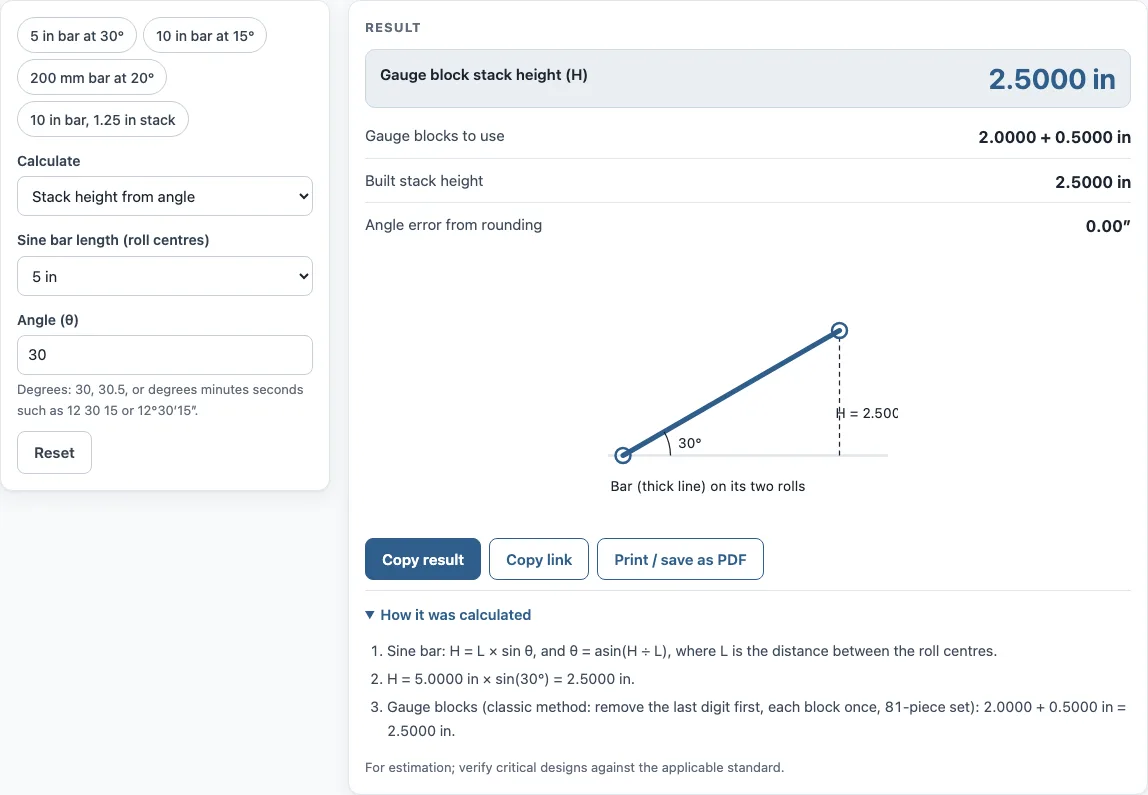
How to use the Sine bar calculator
- Choose the bar length: 5 in, 10 in, 100 mm, 200 mm, or a custom length in inches or mm.
- Pick the mode: stack height from an angle, or angle from a stack height.
- For an angle, type it in decimal degrees (such as 30 or 30.5) or in degrees, minutes and seconds (such as 12 30 15). For a stack height, type the height in the units you chose.
- Read the results. They show the blocks to use, the built stack height, the angle in degrees, minutes and seconds, and the angle error from rounding in arc seconds.
- Check the drawing of the bar on its rolls to confirm the setup.
- Read the warnings. A warning appears above 45° and when the height cannot be built from the standard set.
Copy result copies the result lines with a link. Copy link copies the page address, which stores every input, so opening it later restores the same calculation. Print / save as PDF prints the inputs, results, calculation steps and the date. To see the formula with your own numbers, open “How it was calculated”.
The presets show a 5 in bar at 30°, a 10 in bar at 15°, a 200 mm bar at 20° and a 10 in bar with a 1.25 in stack, so you can see both modes and both block sets.
What is the sine bar formula?
The sine bar formula is H = L × sin θ. H is the height of the gauge block stack under one roll, L is the distance between the roll centres, and θ is the angle the bar is set to. To find the angle from a known stack height, use θ = arcsin(H ÷ L). For a 5 in bar at 30°, H = 5 × 0.5 = 2.5000 in.
How do you calculate gauge block height for a sine bar?
Start with the formula to get the exact height H. Round it to 0.0001 in or 0.001 mm, the precision the tool uses, and then split the rounded height into blocks from the set. For a 10 in bar at 15°, H = 10 × sin 15° = 2.5882 in, which is built from 2.0000 + 0.3500 + 0.1380 + 0.1002 in. Rounding can shift the true angle slightly, which is why the results report an angle error in arc seconds.
How do you set up a 5 inch sine bar?
Place the bar on a surface plate so one roll rests directly on the plate. Build the gauge block stack under the other roll. The bar’s top surface then tilts to the angle you need. Calculate the height first: a 5 in bar at 30° needs a stack of 2.5000 in. Check the stack height before you clamp the workpiece to the bar.
How do you build a gauge block stack?
Use the stack method. Take the last decimal digit of the height, choose the smallest block that ends in that digit, subtract it, and repeat with the next digit. For 2.5882 in, you first remove 0.1002 in, then 0.1380 in, then 0.3500 in, which leaves 2.0000 in. This is a classic way to build a stack with few blocks, but it does not always use the fewest possible. Each block can be used only once, so confirm the set has every size you need.
Why should a sine bar not be used above 45 degrees?
Above 45°, a sine bar loses accuracy. The angle changes more for a given error in stack height as the angle rises, because the sine curve flattens near 90°. A small error in the stack therefore produces a larger error in the angle. Tall stacks are also harder to build and check accurately. For steeper angles, the tool recommends setting up the complement instead, which means working from 90° minus the angle you need.
Sources
- Sine bar (Wikipedia) — H = L × sin θ
- Gauge block sets: 81-piece inch and 87-piece metric contents as listed for Mitutoyo sets at McMaster-Carr
Worked examples
| Input | Result |
|---|---|
| angle 30° | H = 2.5000 in, θ = 30°; blocks: 2.0000 + 0.5000 in |
| angle 15° | H = 2.5882 in, θ = 15°; blocks: 2.0000 + 0.3500 + 0.1380 + 0.1002 in |
| angle 20° | H = 68.404 mm, θ = 20°; blocks: 60.000 + 6.000 + 1.400 + 1.004 mm |
| angle 12 30 15° | H = 1.0826 in, θ = 12.5042°; blocks: 0.8500 + 0.1320 + 0.1006 in |
| stack height 1.2500 in | H = 1.2500 in, θ = 7.18076°; blocks: 1.0000 + 0.2500 in |
Calculated by the tool above with these values.
Frequently asked questions
Can I enter the angle in degrees, minutes and seconds?
Yes. Type 12 30 15 or 12°30′15″, and the tool converts it to decimal degrees. For this example, the angle is 12.5042°, and the results show the angle in degrees, minutes and seconds.
Is the sine bar calculator free to use?
Yes. It runs in your browser with no sign-up, nothing is uploaded, and it works on a phone.
Can I use the results in customer documents?
Yes. You can use the results in commercial work, such as quotes, shop travelers, setup sheets, inspection reports and customer documents, without attribution.
What does the angle error from rounding mean?
The stack height is rounded to 0.0001 in or 0.001 mm before the blocks are chosen, so the built stack can differ slightly from the exact height. The results show the resulting angle error in arc seconds, so you can judge whether it is acceptable for your work.
Which gauge block sets does the tool use?
Inch bars use the standard 81-piece inch set and metric bars the 87-piece metric set, the two most common sets in inspection rooms. Each block is used once; if a height cannot be built from the set after rounding, the tool says so.
Related tools
- Taper angle calculator: use it when you need the angle of a taper from its diameters and length.
- Chamfer calculator: use it to work out the size of a chamfer on an edge.
- True position calculator: use it to check a hole’s location against a tolerance zone.
- Bolt circle calculator: use it to place holes evenly spaced on a circle.
- Decimal to fraction inches: use it to convert a decimal inch size, such as a block height, to a fraction.
- All machining calculators: use it to browse the full set of tools.