G Code List
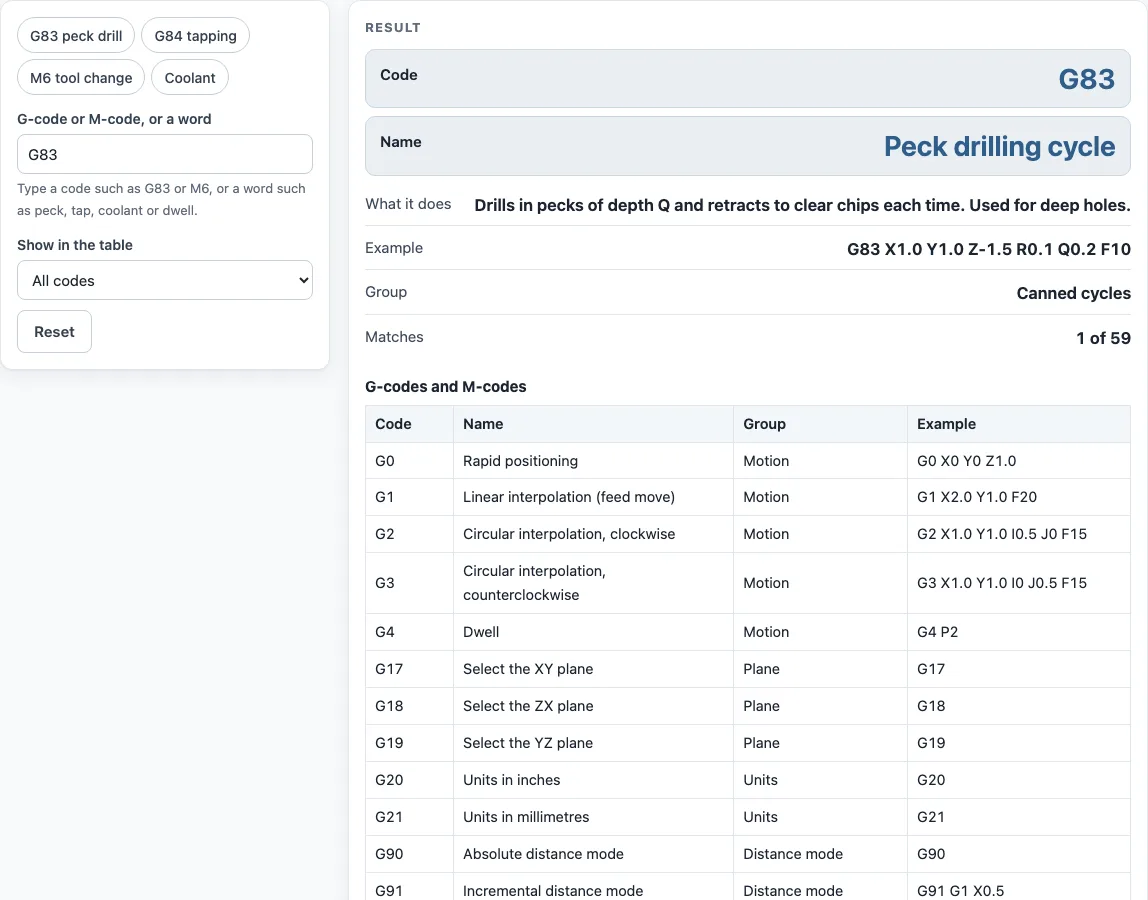
Type a G-code or M-code, or a word like peck, tap or coolant, to see what it does and an example block.
This G code list covers the common G-codes and M-codes used to program CNC mills and lathes. Type a code such as G83 or M6, or a word such as peck, tap, dwell or coolant, and the tool shows the code, its name, what it does and an example block. The table under the result lists every code, and you can narrow it to one group such as canned cycles, offsets or coolant.
It is a quick reference for machinists and hobbyists who read or write G-code by hand. The meanings follow the open-source LinuxCNC reference; other controls such as Fanuc and Haas agree on the common codes but differ in details, so the page warns you about that.
How to use the G code list
- Type a code in the first box. Capital letters, small letters and leading zeros are all fine: G83, g83 and G083 find the same code.
- Or type a word, such as peck, tapping, spindle or coolant. Every word you type must appear in the code’s name or description.
- Read the code, its name, what it does and the example block. If several codes match, the first is shown and the rest are in the table.
- Use “Show in the table” to list only one group, for example the canned cycles G73 and G80 to G89.
- Use the preset chips for G83, G84, M6 and coolant to see typical lookups with one click.
- Copy the example block as a starting point, then change the numbers to match your part, units and work offset.
G55 to G59.3 are covered by the work coordinate row (G54). Copy link keeps your search in the address. Print / save as PDF prints the result and the table with the date. If a search finds nothing, the tool says so and suggests a code or a word to try; the table stays visible so you can scan it by eye. Nothing you type leaves your browser.
What is G-code?
G-code is the programming language most CNC machines read. A program is a list of blocks, one per line. Each block has words made of a letter and a number: G words choose a motion or mode, M words switch machine functions such as the spindle and coolant, and X, Y, Z, F, S, T and others give positions, feed, spindle speed and tool numbers.
What is the difference between G-codes and M-codes?
G-codes (preparatory codes) set how the machine moves and how it reads the numbers: rapid or feed moves, arcs, planes, units, offsets and canned cycles. M-codes (miscellaneous codes) control the machine itself: spindle on and off, coolant, tool change, program stop and end.
What does G83 do?
G83 is the peck drilling cycle. The drill feeds in steps of the Q depth and retracts after each peck to clear chips, which is why it is used for deep holes. A typical block is G83 X1.0 Y1.0 Z-1.5 R0.1 Q0.2 F10: hole position X and Y, final depth Z, retract plane R, peck depth Q and feed F. G73 is the chip-breaking version that only backs off a little.
What is the difference between G98 and G99?
Both set where a canned cycle retracts after each hole. G98 returns to the level the cycle started from; G99 returns only to the R plane. G99 is faster when you drill several holes in a row on a flat surface, and G98 is safer when there are clamps or raised areas between holes.
What does M6 do?
M6 changes the tool to the one selected by the last T word, for example T2 M6. Many controls also need the tool length offset applied with G43 after the change, as in G43 H2 Z1.0.
How accurate is this list for my machine?
The wording follows the LinuxCNC reference, and the common codes (G0, G1, G2, G3, G17 to G21, G40 to G43, G54, G80 to G89, G90, G91, M3, M5, M6, M8, M9) behave alike on most controls. Dwell units, the threading cycle G76, the back-boring cycles G87 and G88 and the program-end codes vary by control, so confirm them in your machine’s manual.
Sources
- LinuxCNC G-code reference: codes and meanings. Checked October 2026.
- LinuxCNC M-code reference: M-code meanings.
- Descriptions and example blocks are ours, written from those references; example numbers are illustrative.
Worked examples
| Input | Result |
|---|---|
| G83 | G83: Peck drilling cycle |
| G84 | G84: Right-hand tapping cycle |
| M6 | M6: Tool change |
| G43 | G43: Apply tool length offset |
| coolant | M7: Mist coolant on |
Calculated by the tool above with these values.
Frequently asked questions
Is there a G code cheat sheet I can print?
Yes. Leave “Show in the table” on “All codes”, then use Print / save as PDF. The printout holds the table of every code with its name, group and an example block.
Are G-codes the same on Fanuc, Haas and Mach3?
The common ones are. Fanuc-style controls such as Haas share most of the codes in this list. Differences show up in canned-cycle words, threading cycles, dwell units and some M-codes, so check your control’s programming manual before running a new program.
What is a modal G-code?
A modal code stays active until another code in the same group replaces it. G1 stays in effect for the next lines, and so does G90. A non-modal code, such as G4 or G53, applies only to the line it is on.
Why does G84 need a special feed?
Tapping feed must match the spindle: feed equals spindle speed times thread pitch. A 1/4-20 tap at 500 rpm needs 500 ÷ 20 = 25 inches per minute, which is the F25 in the example line.
Can I run these example blocks on my machine?
Only after you adapt them. The numbers are illustrations. Check units, work offsets, tool numbers and clearances for your own setup, and prove out a new program with the machine in single-block mode.
Related tools
- Speeds and feeds calculator: use it to get the S and F values you put in a block.
- Drill and tap chart: use it to find the tap drill size for a G84 tapping cycle.
- Bolt circle calculator: use it to get hole coordinates for a G81 or G83 pattern.
- Chamfer calculator: use it to find the Z depth for a chamfer mill.
- Drill point calculator: use it to find the extra depth a drill point adds to a blind hole.
- All machining calculators: use it to browse every calculator on the site.