Countersink Depth Calculator
Enter the countersink angle and the diameter you need at the surface to get the depth to set, or the diameter a depth gives.
The countersink depth calculator works out how far a countersink cone reaches into the material for a given diameter and angle, or the diameter it produces for a given depth. It runs in your browser, it is free, and no sign-up is needed. Choose the included angle, enter a diameter or depth, and the result appears as you type, in both inches and millimetres. It handles pointed tools and flat-tip tools, and it also gives the depth of the countersink itself when you enter the hole diameter.
Typical uses are setting the Z depth of a countersink or spot drill on a CNC mill and checking a countersink against the drawing.
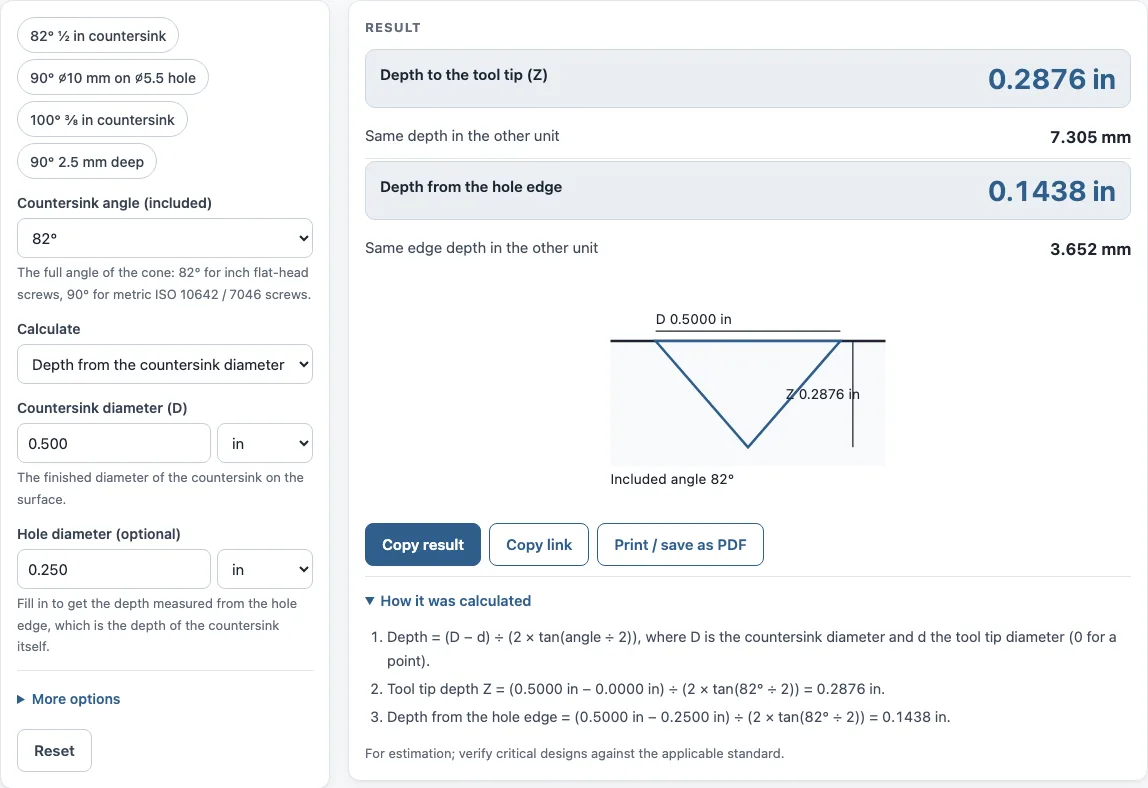
How to use the Countersink depth calculator
- Choose the calculation mode: depth from the countersink diameter, or countersink diameter from the depth.
- Select the countersink angle (the included angle of the cone): 60°, 82°, 90°, 100°, 110°, 118° or 120°. For any other angle, choose the option for another angle and type it in.
- Enter the countersink diameter at the surface, or the depth, depending on the mode you chose. Pick your unit if you need to change it.
- If you need the depth of the countersink itself, enter the hole diameter. The result is then measured from the hole edge.
- If you are using a chamfer mill or a flat-tip tool, enter the tool tip diameter. Leave it at 0 for a pointed countersink.
- Read the results. Each depth and diameter is shown in both inch and mm. A warning appears if the tool tip is larger than the hole.
- Check the How it was calculated section to see the formula and each step with your numbers.
To keep your work, use Copy link, which copies the page address with every input stored in it. Opening that link later restores the same calculation. Copy result copies the result lines with a link, and Print / save as PDF prints the inputs, results, calculation steps and the date.
How do you calculate countersink depth?
Countersink depth is found from a right triangle formed by the cone. The depth to the tool tip is (D − d) ÷ (2 × tan(θ ÷ 2)), where D is the countersink diameter at the surface, d is the tool tip diameter, and θ is the included angle. For a pointed countersink, d is 0, so the depth is D ÷ (2 × tan(θ ÷ 2)).
How deep should an 82 degree countersink be?
An 82° countersink is not a fixed depth; it depends on the diameter. For a pointed tool, its depth to the tip is the diameter multiplied by about 0.575. For example, a ½ in (0.500 in) 82° countersink reaches 0.2876 in (7.305 mm) to the tool tip. The 82° angle is the standard for inch flat-head screws.
What is the countersink angle for metric screws?
The usual angle for metric flat-head screws is 90°, as set out in ISO 10642 and ISO 7046. At 90°, the depth to the tool tip is exactly half the countersink diameter, so a ⌀10 mm countersink reaches 5.000 mm deep. Use 82° for inch flat-head screws, and check the drawing or fastener standard if your part specifies something different.
How do you find countersink diameter from depth?
Rearrange the formula: D = d + 2 × depth × tan(θ ÷ 2). When you enter a hole diameter, the depth is measured from the hole edge, so the calculation becomes D = hole + 2 × depth × tan(θ ÷ 2). For example, a 90° countersink 2.5 mm deep around a ⌀5.5 mm hole has a diameter of 5.5 + 2 × 2.5 × 1 = ⌀10.5 mm.
Why does the tip diameter matter?
A chamfer mill or a flat-tip countersink has no sharp point, so it reaches a given diameter at a shallower depth than a pointed tool. The calculator subtracts the tip diameter before dividing by 2 × tan(θ ÷ 2), and also shows the depth to the theoretical cone point so you can compare the two.
Sources
- Countersink (Wikipedia) — common cutter angles; 82° for Unified flat-head screws (ASME B18.6.3), 90° for ISO metric
- Depth from cone geometry: Z = (D − d) ÷ (2 tan(θ ÷ 2))
Worked examples
| Input | Result |
|---|---|
| 82° countersink, diameter 0.500 in | Depth to the tool tip 0.2876 in (7.305 mm) |
| 90° countersink, diameter 10 mm | Depth to the tool tip 5.000 mm (0.1969 in) |
| 100° countersink, diameter 0.375 in | Depth to the tool tip 0.1573 in (3.996 mm) |
| 90° countersink, depth 2.5 mm | Countersink diameter 10.500 mm (0.4134 in) |
| 120° countersink, diameter 12 mm | Depth to the tool tip 2.887 mm (0.1137 in) |
Calculated by the tool above with these values.
Frequently asked questions
How do I set countersink depth on a CNC with a spot drill?
Use the depth to the tool tip as the depth of the tool below the surface. Enter the countersink diameter and angle, and use the tool tip diameter if your spot drill or chamfer mill has a flat tip. Measure from your own part zero, and check the result with a test cut on scrap before running the job.
Does the hole diameter change the depth?
Yes, when you enter a hole diameter, the tool shows the depth measured from the hole edge, which is the depth of the countersink itself. Without a hole diameter, the result is the depth to the tool tip. Check which value your setup needs before you use it.
Can I use the results in a quote or shop document?
Yes. Results may be used in commercial work, including quotes, shop travelers, setup sheets, inspection reports and customer documents, without attribution. Print / save as PDF gives you a copy with the inputs, results, steps and date.
Does the tool upload or store my numbers?
Everything runs in your browser, and nothing is uploaded. The only place your inputs are kept is the page address that Copy link creates, so the calculation can be reopened later.
Related tools
- Chamfer calculator: use it when you need the size of an edge chamfer rather than a countersink cone.
- Drill and tap chart: use it to look up tap drill sizes for the hole you are countersinking.
- Drill size chart: use it to compare drill sizes in inches and millimetres when choosing a hole diameter.
- Bolt circle calculator: use it to place a pattern of countersunk holes evenly around a circle.
- Taper angle calculator: use it when you need the angle of a tapered surface rather than a countersink.
- Drill point calculator: use it to find the point length and tip depth of a drill.
- Machine screw size chart: use it to look up the diameter of the screw you are countersinking for.
- All machining calculators: use it to browse every calculator on the site.