Chip Load Calculator
Find the chip load (feed per tooth) from your feed rate, or the feed rate for a chip load, and correct it for light radial cuts.
The chip load calculator works out how much material each cutting edge removes per turn, and converts between chip load, feed rate, and spindle speed. Enter your spindle speed, number of flutes, and feed rate to see the chip load you are running, or enter a chip load to get the feed rate to program. It runs in your browser, is free, and needs no sign-up.
Results show chip load in inches and millimetres, feed rate in IPM and mm/min, and feed per revolution. Optional cutter diameter and radial width of cut add a chip thinning correction for side-milling cuts. It is designed for milling and routing setups where you know the spindle speed and flute count.
How to use the Chip Load Calculator
- Choose a mode. Use “feed rate → chip load” to see the chip load you are running, or “chip load → feed rate” to find the feed to program.
- Enter the spindle speed in rpm.
- Enter the number of flutes on the cutter.
- Enter the feed rate in IPM or mm/min, or enter the chip load per tooth in inches or mm, depending on the mode you chose.
- Optional: enter the cutter diameter and radial width of cut to apply chip thinning.
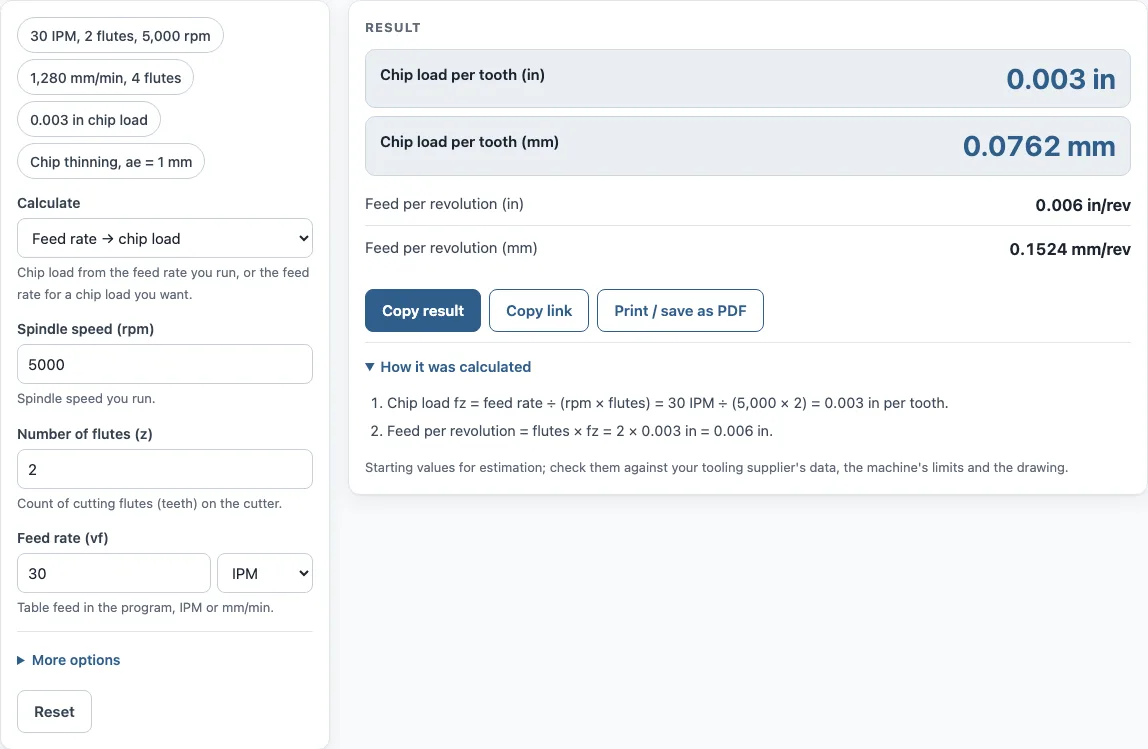
- Read the results: chip load in inches and mm, feed rate in IPM and mm/min, and feed per revolution in inches and mm.
- Open “How it was calculated” to see the formula and each step with your numbers.
Results update as you type. Copy result copies the result lines with a link. Copy link copies the page address, which stores every input, so opening it later restores the same calculation. Print / save as PDF prints the inputs, results, calculation steps and the date. The tool also works on a phone.
Use the presets to see the modes with real numbers: 30 IPM with 2 flutes at 5,000 rpm, 1,280 mm/min with 4 flutes, a 0.003 in chip load, and a chip-thinning case with a 1 mm radial width of cut.
What is the chip load formula?
Chip load is the thickness of material each flute removes in one revolution of the cutter. The formula is chip load = feed rate ÷ (rpm × number of flutes), so feed rate = rpm × flutes × chip load. Keep feed rate and chip load in matching units, either inches or millimetres.
How do you calculate chip load?
Divide the feed rate by the spindle speed and the number of flutes. For example, 1,280 mm/min at 8,000 rpm with 4 flutes gives 1,280 ÷ (8,000 × 4) = 0.04 mm per tooth. The same method with 30 IPM at 5,000 rpm and 2 flutes gives 0.003 in per tooth.
How do you calculate feed rate from chip load?
Multiply the spindle speed, the number of flutes, and the chip load. For 0.003 in per tooth at 5,000 rpm with 2 flutes, the feed is 5,000 × 2 × 0.003 = 30 IPM. This is the feed to program when you have a chip load from a catalog or from your own tests.
What is feed per tooth?
Feed per tooth is another name for chip load. Feed per revolution is chip load multiplied by the number of flutes, which is how far the tool advances in one spindle turn.
What is chip thinning?
Chip thinning happens when the radial width of cut is less than half the cutter diameter. The chip then comes out thinner than the programmed feed per tooth, and the actual thickness is feed per tooth × 2√(ae/D − (ae/D)²), where ae is the radial width and D is the diameter. In chip load → feed mode, the tool treats your chip load as the target thickness and shows the larger feed per tooth needed to reach it. Very light radial cuts give large corrections, so check the result before you use it.
Is chip load the same for a CNC router?
The formula is the same for a router bit. Chip load is feed per tooth, so spindle speed, flute count and feed relate in the same way. The values you use will differ, because router bits vary in flute count and cut different materials, so take the chip load from the tool manufacturer’s catalog for wood or plastics.
Sources
- Sandvik Coromant, milling formulas and definitions — table feed, chip thinning and metal removal rate
- 1 in = 25.4 mm exactly (NIST SP 811)
Worked examples
| Input | Result |
|---|---|
| 30 IPM, 5000 rpm, 2 flutes | 0.003 in (0.0762 mm) per tooth |
| 1280 mm/min, 8000 rpm, 4 flutes | 0.001575 in (0.04 mm) per tooth |
| 0.003 in per tooth, 5000 rpm, 2 flutes | 30 IPM (762 mm/min) |
| 0.05 mm per tooth, 6000 rpm, 3 flutes | 59.06 IPM (1,500 mm/min) |
| 40 IPM, 5000 rpm, 2 flutes | 0.004 in (0.1016 mm) per tooth |
Calculated by the tool above with these values.
Frequently asked questions
What chip load should I use for aluminium or steel?
The calculator has no built-in chip loads for materials. Use the tool manufacturer’s catalog values for your material, then enter them as the chip load.
What happens if the chip load is too small?
A chip load that is too small rubs instead of cutting, which wears the tool. A chip load that is too large overloads the cutting edge.
What does the unit warning mean?
A chip load above 25% of the cutter diameter suggests a unit mix-up, such as inches entered as millimetres. Check the units on both fields.
Can I use the results in customer documents?
Yes. Results may be used in commercial work such as quotes, shop travelers, setup sheets and inspection reports, without attribution.
Is it free, and does it work on a phone?
Yes. It is free, requires no sign-up, runs in your browser, and works on a phone. Nothing is uploaded.
Does chip thinning apply to every cut?
No. It applies only when the radial width of cut is less than half the cutter diameter. At half the diameter or more, the chip is as thick as the feed per tooth, and the tool shows no correction.
Related tools
- Speeds and feeds calculator: use it when you need spindle speed and feed together from a cutting speed.
- SFM calculator: use it to convert between surface feet per minute and rpm for a given diameter.
- Material removal rate calculator: use it to estimate how much material you remove per minute.
- Surface finish calculator: use it to estimate the surface finish a feed rate will leave.
- Drill size chart: use it to look up drill sizes in fractional, number, letter and metric form.
- All machining calculators: use it to browse every calculator on the site.