Chamfer Calculator
Work out the missing sizes of a chamfer, or how deep to plunge a chamfer mill or spot drill for the chamfer you need.
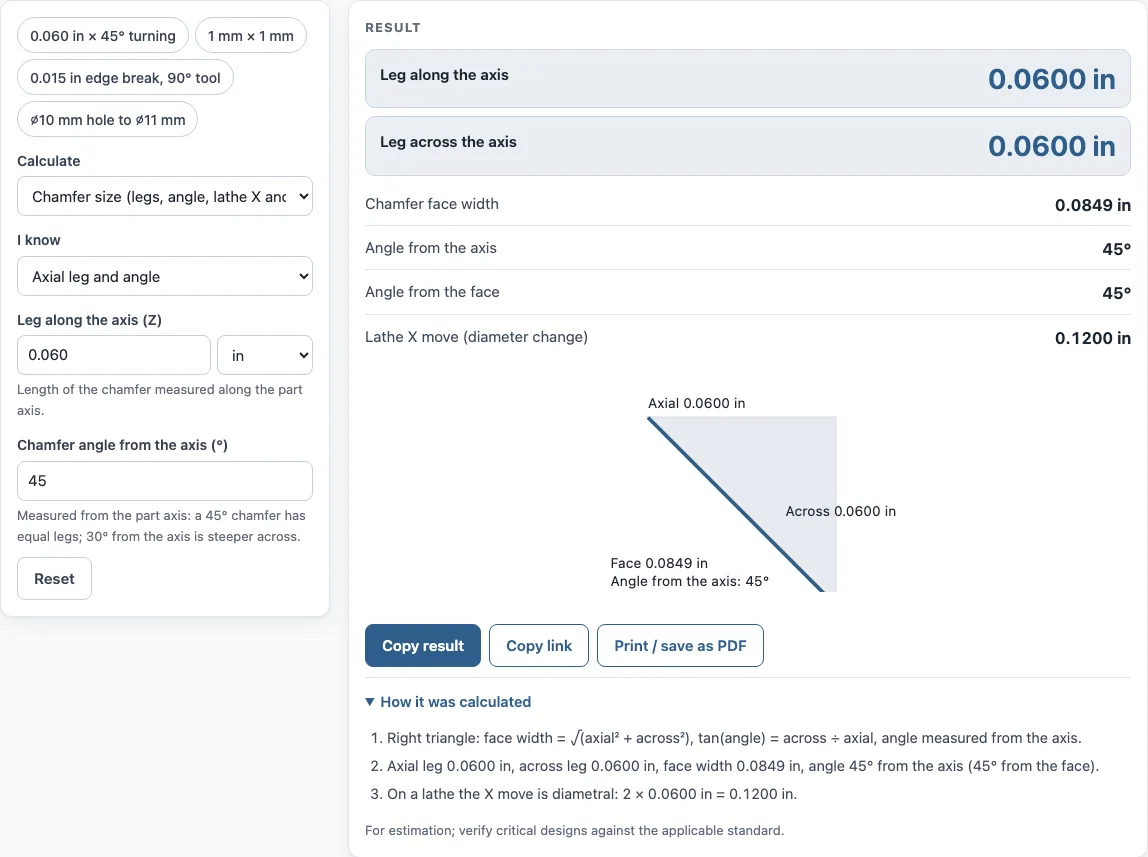
How to use the Chamfer calculator
- Choose a mode: Chamfer size or Chamfer mill depth (Z).
- In chamfer size mode, pick the two values you know. The six options are both legs, axial leg and angle, radial leg and angle, face width and angle, axial leg and face width, or radial leg and face width.
- Enter the angle measured from the part axis (45° gives equal legs). The tool also shows the angle from the face, 90° minus it.
- Read the results: axial leg, radial leg, face width, and the lathe X move (the diameter change, which is twice the radial leg).
- In chamfer mill mode, select the tool included angle: 60°, 82°, 90°, 100°, 120°, or another angle.
- Enter the tool tip diameter. Use 0 for a pointed spot drill, or the flat diameter of a chamfer mill.
- Enter the hole diameter and the chamfer size. You can give the size as a chamfer width on the hole edge or as the finished outer diameter at the surface.
- Read the Z depth to the tip, the outer diameter, the radial width, and the chamfer length down the hole wall.
- Check any warning.
Open How it was calculated to see the formula and each step with your numbers. Copy result copies the result lines with a link. Copy link copies the page address, which stores every input in the URL (?s=…), so opening it later restores the same calculation. Print / save as PDF prints the inputs, results, calculation steps, and the date.
How do you calculate a chamfer?
A chamfer is defined by two legs: the axial leg, which runs along the part axis (Z), and the radial leg, which runs across it. If you know the axial leg and the angle measured from the axis, the radial leg is the axial leg multiplied by tan(angle). The formula is across = axial × tan(angle).
How do you calculate a 45 degree chamfer?
At 45°, tan(45°) = 1, so the two legs are equal. The face width is each leg multiplied by √2, which is about 1.414. For example, 0.060 in legs give a face width of 0.0849 in, and 1 mm legs give a face width of 1.414 mm.
What is the hypotenuse of a chamfer?
The hypotenuse is the chamfer face width, the straight diagonal across the cut from the end of one leg to the end of the other. It is found with the Pythagorean theorem: face = √(axial² + across²). For example, an across leg of 0.5 mm at 30° gives an axial leg of 0.866 mm and a face width of 1.000 mm, because 0.866² + 0.5² = 1.
How deep do I plunge a chamfer mill?
The plunge depth Z is the distance from the outer diameter of the chamfer down to the tool tip. Use Z = (outer diameter − tip diameter) ÷ 2 ÷ tan(half the tool angle). A 90° tool has a half angle of 45°, and tan(45°) = 1, so Z is simply half of (outer diameter − tip diameter). A 0.250 in hole with a 0.015 in edge break gives a 0.280 in chamfer diameter. With a pointed 90° tool (tip 0), Z = 0.1400 in. In metric, a ⌀10 mm hole chamfered to ⌀11 mm with a 0.2 mm tip gives Z = 5.400 mm.
How do you program a chamfer on a lathe?
Program the chamfer as two moves. The Z move equals the axial leg. The X move equals 2 × the radial leg, because X is measured in diameter, not radius. For example, 1 mm × 1 mm legs at 45° give a Z move of 1 mm and an X move of 2 mm. Enter these values in the format your control expects, and the calculator’s lathe X move result gives you the X value directly.
Sources
- Chamfer legs, face width and angle from right-triangle trigonometry; chamfer-mill depth from cone geometry
- Chamfer (Wikipedia) — 45° as the usual chamfer angle
Worked examples
| Input | Result |
|---|---|
| axial leg 0.060 in, 45° | axial 0.0600 in, across 0.0600 in, face 0.0849 in, 45° from the axis |
| legs 1 mm and 1 mm | axial 1.000 mm, across 1.000 mm, face 1.414 mm, 45° from the axis |
| across leg 0.5 mm, 30° | axial 0.866 mm, across 0.500 mm, face 1.000 mm, 30° from the axis |
| 90° tool, tip 0 in, hole 0.250 in, size 0.015 in | Z = 0.1400 in for a chamfer ⌀ 0.2800 in |
| 90° tool, tip 0.2 mm, hole 10 mm, size 11 mm | Z = 5.400 mm for a chamfer ⌀ 11.000 mm |
Calculated by the tool above with these values.
Frequently asked questions
What chamfer angle should I use?
45° is the most common chamfer angle. The calculator shows a warning for any angle other than 45°, 30° or 60°, so check the angle against your drawing before you cut.
What happens if the tool tip is bigger than the hole?
The calculator shows a warning when the tool tip is larger than the hole. Check the tool diameter and the hole size before you set the depth.
Do I need to sign up to use the chamfer calculator?
No. The calculator is free, needs no sign-up, and runs in your browser. Your inputs are not uploaded.
Can I use the results in a quote or a shop traveler?
Yes. Results may be used in commercial work, such as quotes, shop travelers, setup sheets, inspection reports, and customer documents, without attribution.
How do I save a calculation for later?
Use Copy link. It copies the page address, which stores every input in the URL (?s=…). Opening that link later restores the same calculation.
Is the chamfer angle measured from the axis or the face?
The calculator measures it from the part axis. If your drawing gives the angle from the face, enter 90° minus that angle; the result shows both angles so you can check.
Related tools
- Countersink depth calculator: use it to find the depth of a countersink for a flat-head screw.
- Taper angle calculator: use it when you need the angle of a tapered part from its diameters and length.
- Drill and tap chart: use it to look up tap drill sizes for common threads.
- Drill size chart: use it to compare drill sizes in fractional, number, letter, and metric form.
- Sine bar calculator: use it to set an angle on a sine bar using gauge block heights.
- All machining calculators: use it to browse every calculator on the site.