Bolt Circle Calculator
Enter the number of holes and the bolt circle diameter to get the X/Y coordinates of every hole, the chord between holes and a drawing.
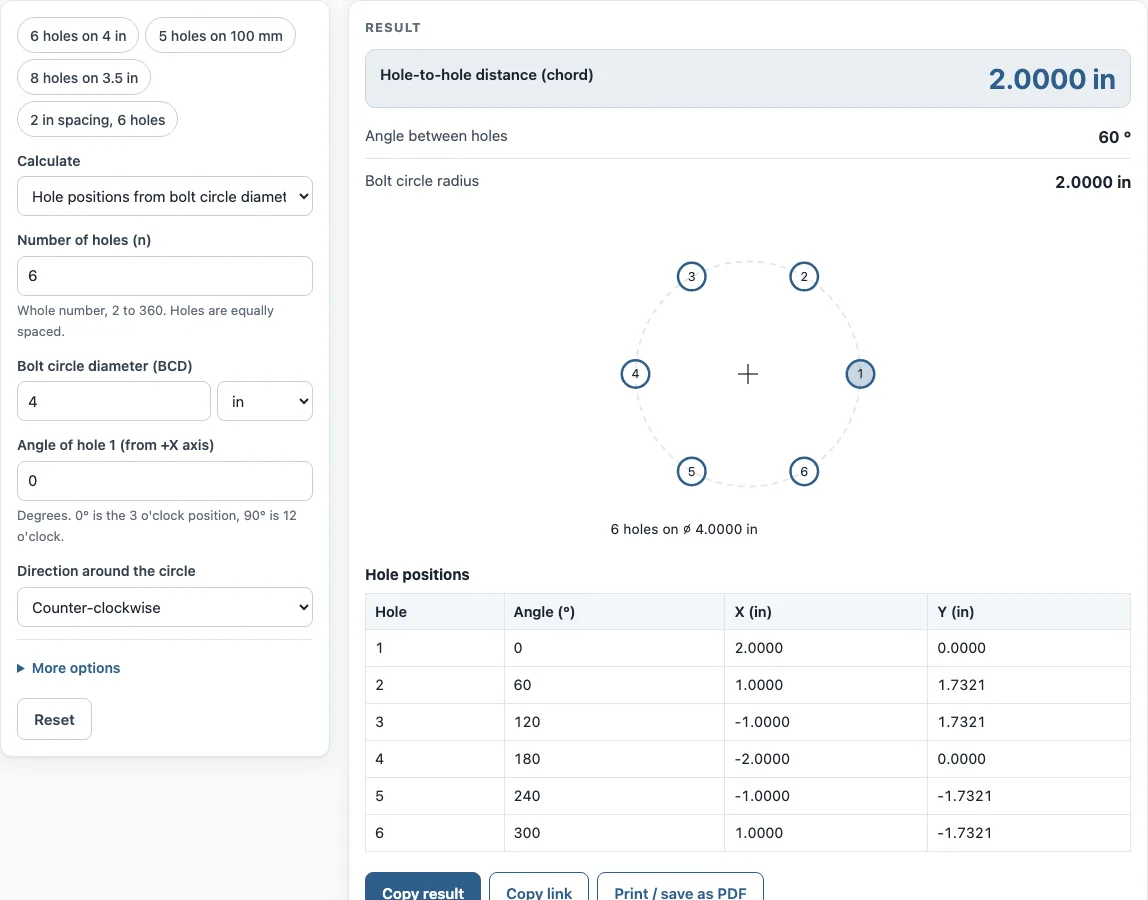
How to use the Bolt circle calculator
- Pick a mode: hole positions from the diameter of the bolt circle, or the diameter itself from the spacing between neighbouring holes.
- Type in the hole count, from 2 to 360. Holes sit at equal intervals around the circle.
- Input the BCD and select inches or mm.
- Set the angle of hole 1, measured from the +X axis. 0° points to 3 o’clock, 90° to 12 o’clock.
- Pick counter-clockwise or clockwise to set how the holes are numbered.
- When the circle is off the part zero, expand more options and enter the centre X and Y. Keep both at 0 for a circle centred on the part zero.
- Review the results: hole-to-hole distance, angle between holes, bolt circle radius, and the table of hole number, angle, X and Y.
- Look at the drawing and confirm hole 1 lands where you expect.
Use Copy result to copy the result lines with a link. Copy link copies the page address. That address stores every input, so opening it later brings back the same calculation. Print / save as PDF prints the inputs, results, calculation steps and the date. To feed the numbers into a CNC machine, paste the X/Y table into your program or enter the same values into a manual mill’s DRO.
How do you calculate bolt circle coordinates?
Every hole’s position is set by the circle’s centre, its radius, and the hole’s angle. Using X = cx + R cos(θ) and Y = cy + R sin(θ), cx and cy are the circle centre, R is the radius, and θ is that hole’s angle. Radius is half of the diameter, so R = BCD ÷ 2.
Each hole’s angle follows θ = start angle + (i − 1) × 360° ÷ n, with i as the hole number and n as the total count. Hole 1 takes the start angle you enter. Subsequent holes step forward by 360° ÷ n, and the direction setting determines how the numbering runs around the circle.
As an example, consider 4 holes on a 114.3 mm circle with hole 1 at 45°. Radius works out to 57.15 mm. Hole 1 lands at X = 57.15 × cos 45° ≈ 40.411 and Y = 57.15 × sin 45° ≈ 40.411. Remaining holes fall at 135°, 225° and 315°, forming the four corners of a square on that circle.
What is the formula for the distance between holes on a bolt circle?
Neighbouring hole centres are joined by a straight line called the chord, and its length is BCD × sin(180° ÷ n). The angle between neighbouring holes is 360° ÷ n. Because the chord cuts straight across the arc between two holes, the formula uses half of that angle.
Consider 6 holes on a 4 in circle. Each step measures 360° ÷ 6 = 60°, and sin(30°) = 0.5, so the chord comes to 4 × 0.5 = 2.0000 in. With 5 holes on 100 mm, the chord is 100 × sin(36°) = 58.779 mm.
You can also run the formula backwards. From a measured chord, BCD = chord ÷ sin(180° ÷ n) gives the diameter. If the 6-hole spacing is 2.0000 in, then BCD = 2.0000 ÷ 0.5 = 4.0000 in. With two holes, sin(90°) = 1, so the chord equals the diameter.
Sources
- Hole coordinates X = Cx + R cos φ, Y = Cy + R sin φ and chord D × sin(180° ÷ n), plane trigonometry
Worked examples
| Input | Result |
|---|---|
| 6 holes on ⌀ 4.0000 in, hole 1 at 0° | Chord 2.0000 in, BCD 4.0000 in, 60° between holes |
| 5 holes on ⌀ 100.000 mm, hole 1 at 90° | Chord 58.779 mm, BCD 100.000 mm, 72° between holes |
| 8 holes on ⌀ 3.5000 in, hole 1 at 22.5° | Chord 1.3394 in, BCD 3.5000 in, 45° between holes |
| 6 holes, 2.0000 in between holes | Chord 2.0000 in, BCD 4.0000 in, 60° between holes |
| 4 holes on ⌀ 114.300 mm, hole 1 at 45° | Chord 80.822 mm, BCD 114.300 mm, 90° between holes |
Calculated by the tool above with these values.
Frequently asked questions
How do you measure a bolt pattern?
Count the holes, then measure the centre-to-centre distance between two neighbouring holes with a caliper or similar tool. Enter that distance in the diameter mode to get the bolt circle diameter. If you measure from edge to edge, add one hole diameter to get the centre-to-centre distance.
What does “4 on 4.5” mean?
A bolt pattern written as “4 on 4.5” means 4 holes on a 4.5 in bolt circle diameter. A pattern written as “5 x 114.3” means 5 holes on a 114.3 mm bolt circle diameter. Enter the first number as the hole count and the second as the BCD.
Where does hole 1 start?
Hole 1 starts at the start angle you enter, measured from the +X axis. 0° is 3 o’clock and 90° is 12 o’clock. The drawing marks hole 1, so check it against your part before you use the table.
Can I use the results in commercial work?
Yes. Results may be used in commercial work, including quotes, shop travelers, setup sheets, inspection reports and customer documents, without attribution.
Does the calculator work with two holes or with many holes?
Yes. It accepts 2 to 360 holes. With two holes, the chord equals the diameter. Above 60 holes, the tool shows a check warning, so confirm that the count is what you intend.
Is my data uploaded anywhere?
No. Everything runs in your browser, and nothing is uploaded.
Related tools
- True position calculator: verify hole locations against a tolerance once the bolt circle is set.
- Drill and tap chart: find the drill and tap sizes for the holes you plan to make.
- Drill size chart: look up a drill size by fraction, number, letter or metric size.
- Countersink depth calculator: handy when the bolt holes need countersinks.
- Sine bar calculator: helpful for setting an angle on a part.
- All machining calculators: browse every calculator on the site.